You typed your description, hit Generate, and watched the progress messages roll by — "Architecting Your Site," "Locking In Your Vision." Then either the screen just stopped moving for a while, or you got a red error card telling you generation failed. Your first instinct is probably to refresh the page, or worse, start over from scratch and lose everything you typed.
Don't. MakeOurs' AI generation is built specifically to survive exactly this situation — a closed tab, a dropped connection, a refresh, even a genuine failure partway through. This guide explains what's actually happening when generation looks stuck, what a "failed" result really means, and the right way to get your site finished without losing progress.
1. Why Generation Doesn't Live in Your Browser Tab
On most AI tools, closing the tab mid-generation kills the job — the connection to the AI drops, and whatever was in progress is gone. MakeOurs works differently: the moment you click Generate, the job is handed off to a background process that runs independently of your browser. Your tab is just watching it happen, not powering it.
That means:
- Closing the tab does not stop generation
- Losing your internet connection for a moment does not stop generation
- Refreshing the page does not restart generation from zero — it reconnects to the same job and picks up exactly where the progress bar left off
If you left mid-generation and come back later, reopen your site from the dashboard. If it's still running, you'll see the same progress screen pick up live, as if you never left.
2. What "Stuck" Usually Actually Means
A real generation run can legitimately take several minutes — the AI pipeline runs multiple steps (structuring content, writing copy, choosing images, applying your brand details), and some steps retry automatically if a step needs another attempt. A progress screen that hasn't visibly changed for a minute or two is very often still working, not stuck.
Give it a genuine few minutes before assuming something is wrong. If it's been sitting at the same step for a long stretch (well beyond what any of the earlier steps took), or you see an explicit error card instead of a progress screen, that's the point to act — covered in the next section.
3. What to Do When You See a "Generation Failed" Card
If generation genuinely fails, MakeOurs shows a dedicated error card rather than leaving you guessing. There are two distinct flavours of this, and the fix is different for each:
"We can't build this one" (restricted content): This appears when your description or details triggered a content restriction — the request touches something the platform won't generate a site for. The fix here is to edit your details and adjust your description, then try again.
A generic failure (technical hiccup): This is usually a temporary worker or platform issue, not a problem with your content. The card gives you the option to retry or resume.
In both cases, click the button on the card rather than starting a brand-new site. Here's why that matters.
4. Why You Should Never Just Abandon a Failed Site and Start Over
If you close the tab on a failed generation and start an entirely new site from your dashboard instead of retrying the same one, you risk two real problems:
You lose whatever entitlement was already attached to that site. If you had already claimed your free plan or paid for a subscription against that specific site, starting a brand-new one from scratch doesn't automatically carry that over — you could end up needing to claim or pay again unnecessarily.
You lose completed work for nothing. Every step of generation that already succeeded — the sections that were already written, images already chosen — is kept. Retrying the same site resumes from the first step that didn't finish, reusing everything that already worked instead of re-spending time (and, on the AI side, real processing) redoing it.
The right move is always to use the Retry, Resume, or Edit Details option on the failed site itself, not to abandon it.
5. How "Resume" Actually Works
When you click retry on a failed or interrupted generation, MakeOurs doesn't restart the whole pipeline from step one. It looks up every step from your previous attempt that completed successfully, and reuses those results directly — only the step that failed (and anything after it) actually runs again.
This is why a retry is usually much faster than the original generation: most of the work is already done and simply gets carried forward.
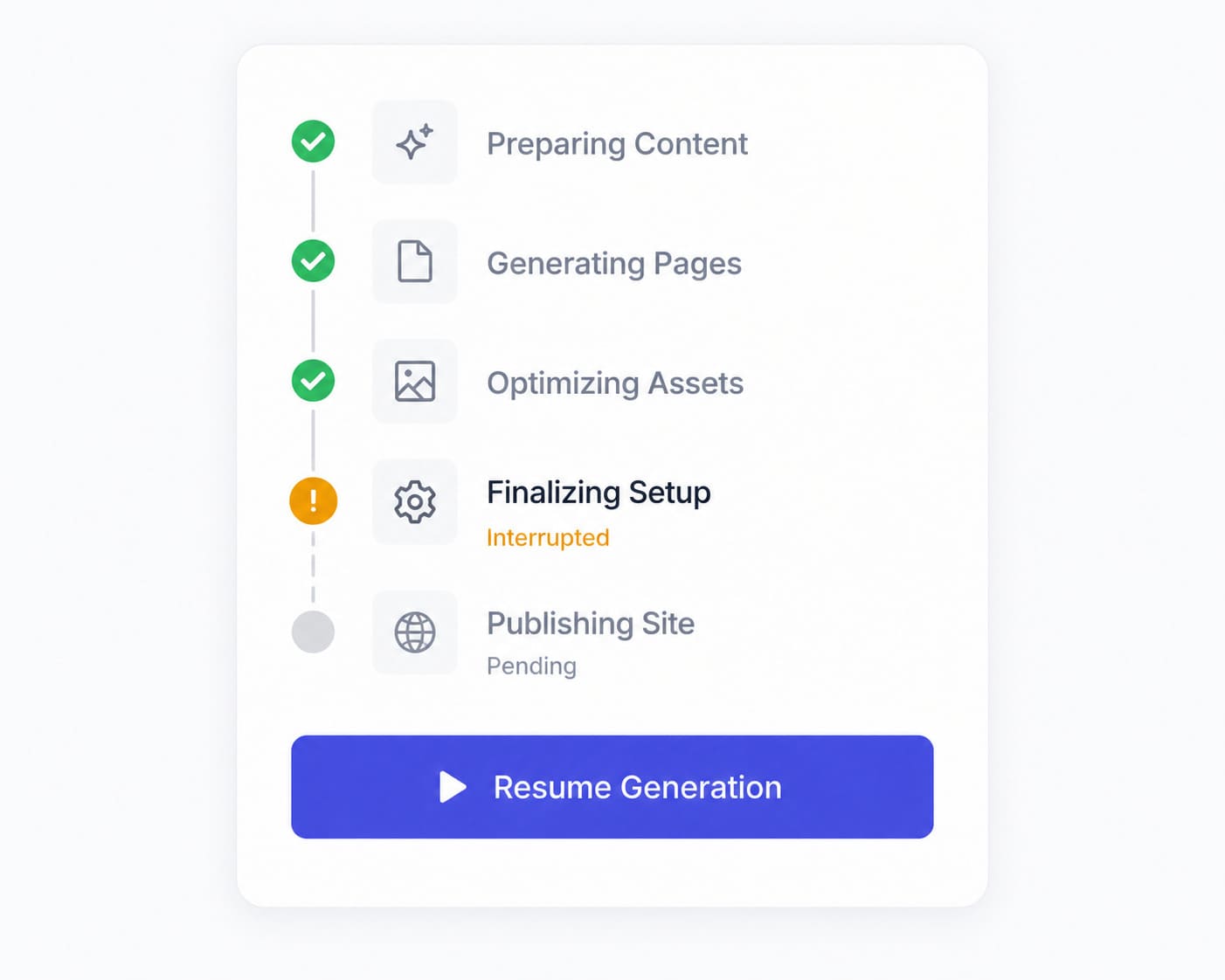 Retrying a failed or interrupted generation resumes from the step that didn't finish — completed steps are reused, not redone.
6. "Edit Details" vs "Retry" — Which One to Click
Click Retry (or Resume) when the failure looks like a technical hiccup — nothing about your description or details seems like the cause. This re-runs the pipeline from the failed step using the same inputs.
Click Edit Details when the failure card specifically flags your content, or when you realize your description was too vague, missing key details, or accidentally included something the AI would reasonably flag. This takes you back to the form with everything you already typed still in place — you're not starting over, just adjusting what you wrote before generating again.
Either path keeps you on the same site record, so nothing about your plan or already-completed steps gets thrown away.
7. A "Stopped" Result Is Not the Same as a Real Failure
You may occasionally see a run marked as "stopped" rather than "failed." This distinction matters: a stopped run means a worker or platform-level hiccup interrupted the job — it is not a signal that anything is wrong with your content or your description. MakeOurs treats this with calmer messaging for exactly this reason. Retry a stopped run the same way you would retry a failed one — it resumes from the last completed step either way.
8. How Long Should You Wait Before Trying Again?
Give an in-progress generation a genuine several minutes — model calls with retries can legitimately take that long, especially for a detailed prompt with multiple extras (team, testimonials, pricing) turned on.
If you refresh and the progress screen reappears at the same point instead of jumping forward, it's still running — that's expected behavior, not a bug. If instead you land on an explicit failed or stopped card, that's your cue to click Retry, Resume, or Edit Details rather than waiting further.
9. Frequently Asked Questions
Q1: Will I lose my site if generation fails?
No. A failed or stopped generation keeps the site record and every step that already completed successfully. Use the Retry, Resume, or Edit Details option on that same site — don't start a new one.
Q2: Does closing my browser tab stop or restart generation?
No. Generation runs as a background job independent of your browser. Closing the tab, losing connection, or refreshing the page does not stop or restart it — reopening your site reconnects you to the same job in progress.
Q3: What does "We can't build this one" mean?
This message appears when your description or details triggered a content restriction. Click Edit Details, adjust your description, and generate again.
Q4: Why is my retry faster than my original generation?
A retry reuses every step that already completed successfully in your previous attempt and only re-runs the step that failed (and anything after it) — it does not start the whole pipeline over from scratch.
Q5: What's the difference between a "failed" and a "stopped" generation?
"Failed" usually points to a real issue worth reviewing (like restricted content). "Stopped" means a worker or platform-level hiccup interrupted an otherwise normal run — not a problem with your content. Both are retried the same way.
10. Conclusion: Don't Restart — Resume
The single most important thing to know about a stuck or failed MakeOurs generation is that starting over is almost never the right move. The platform is built to survive exactly this scenario — closed tabs, dropped connections, real failures — by keeping every completed step and letting you resume from wherever it stopped.
See a progress screen that hasn't moved in a bit? Give it a few minutes. See an error card? Click Retry, Resume, or Edit Details on that same site. Either way, your progress — and your plan — stays exactly where you left it.
Go back to your dashboard and resume your site — nothing is lost. Go to Your MakeOurs Dashboard
External References & Further Reading:
- Google Cloud: Designing resilient, retry-safe systems
- Web.dev: Building resilient web applications
- MDN Web Docs: How the fetch API and background jobs handle failure
For more guides on getting your MakeOurs site live, visit our Blog section.